
Tools InsightHub

Analytics delivery
GA4 reports where your team already works
Same report → Slack channel, inbox, or both. Scheduled. Readable. No daily dashboard dive, analytics become a delivery habit, not a login chore.
- Scheduled delivery
- Slack + email
- Templates you control
- On-demand via Slack
Connect GA4 once. Choose templates, channels, and a schedule. Reports arrive automatically.
THE PROBLEM
Analytics that stay locked in dashboards
Teams need a shared pulse, not another tab they forget to open. Manual exports and ad-hoc screenshots don’t scale.
-
Dashboards go unopened
Reports live in GA4, but marketing, product, and leadership don’t open it every day.
-
Manual copy-paste ritual
Someone exports numbers, pastes into Slack or email, and hopes the format still makes sense.
-
Leaders want a pulse, not a login
Stakeholders need a readable snapshot without giving everyone another analytics account.
-
Different people, different numbers
Ops, growth, and product each pull their own view, conversations drift without a shared source.
WHAT IT IS
An analytics delivery product
InsightHub connects Google Analytics 4 to Slack and email so the same scheduled report reaches a channel, an inbox, or both, without opening dashboards every day.
Choose a template, toggle the sections you care about, pick delivery channels and a timezone-aware schedule. Pull an on-demand snapshot from Slack when you need it.
It is not another BI suite. It is the last mile: turning GA4 data into a habit your team actually sees.
- GA4 stays the source of truth
- Delivers into Slack and email
- Built for a daily reporting habit

HOW IT WORKS
From GA4 to the channels you use
Four steps from connection to automatic delivery, designed for teams that already live in Slack and email.
- 01
Connect your property
Sign in with Google and connect a GA4 property. Your analytics stay in Google; InsightHub delivers the view.
- 02
Pick template and sections
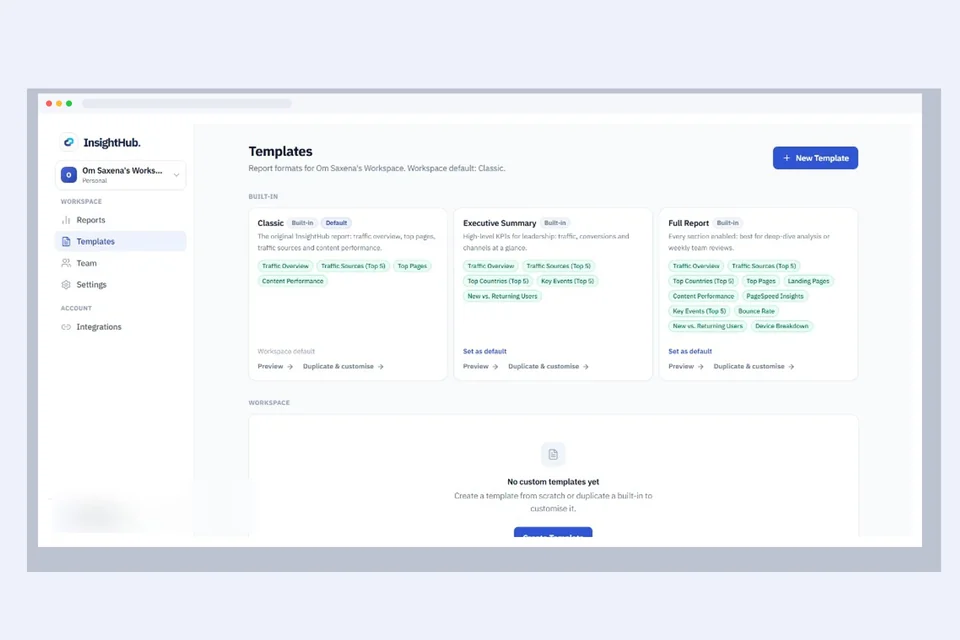
Choose a report template and toggle sections, traffic, sources, conversions, pages, and more.
- 03
Choose Slack and/or email
Send to a Slack channel with optional mentions, an email list, or both, same report, right places.
- 04
Schedule and pull on demand
Set daily, weekly, or monthly delivery with timezone control. Use Slack commands for snapshots and status.
CAPABILITIES
What InsightHub does today
Focused features that make scheduled analytics delivery reliable, not a kitchen-sink dashboard.
-
Slack delivery
Post readable reports to the channels your team already watches, with optional mentions.
-
Email distribution
Deliver the same report to inboxes and lists, Slack is optional when email is enough.
-
Flexible schedules
Daily, weekly, or monthly cadence with timezone awareness so reports land when you expect them.
-
Templates you control
Toggle sections so each report matches the audience, denser for ops, lighter for leadership.
-
Multi-workspace access
Manage delivery across workspaces from one account when agencies or groups need more than one context.
-
Slack commands
Pull a report, check config, or see status from Slack, on-demand without leaving the conversation.


BUSINESS IMPACT
What changes when reporting is automatic
If another company used InsightHub, the win is not “more charts”, it is shared numbers, less busywork, and faster reaction.
-
Less export-and-paste time
Stop spending hours formatting the same weekly snapshot for Slack and email.
-
Faster reaction to shifts
Traffic, source, and conversion changes surface in the workflow, not buried until someone logs in.
-
Inform without oversharing access
Stakeholders stay informed without opening GA4 to everyone who only needs a readable summary.
WHO IT’S FOR
Built for teams that need a shared analytics habit
Anyone who owns growth, product, or client reporting, and is tired of chasing dashboards.
-
Marketing and growth leads
Keep channel and conversion pulse visible without a daily GA4 ritual.
-
Product and ops
Align on traffic and behaviour signals in the same places the team already talks.
-
Founders and leadership
Get a clean scheduled snapshot without another login or a custom BI project.
-
Agencies and multi-property teams
Deliver consistent client or brand reports from the properties you manage.
COMING NEXT
PageSpeed insights, same delivery model
We’re extending InsightHub so performance signals travel the same path as traffic, Slack and email, on a schedule.
- Coming next
PageSpeed / Core Web Vitals
URL scores and performance insights delivered alongside analytics, one workflow for traffic and speed.
INTEGRATIONS
Works with the systems you already trust
InsightHub sits between your source of truth and the channels your team checks every day.
-
Google Analytics 4
Source of truth for traffic, sources, conversions, and pages
-
Slack
Channel delivery, mentions, and slash-command snapshots
-
Email
Inbox and distribution-list delivery when chat isn’t enough
-
Google sign-in
Secure connection to the properties you already manage

WHY WE BUILT IT
Product engineering you can see
InsightHub exists because reporting kept failing the same way: the data was fine, the delivery wasn’t. Teams needed numbers in Slack and email, not another dashboard to remember.
- 01
Started from real friction
We didn’t invent a dashboard problem. We watched teams lose hours to exports, paste jobs, and unread GA4 tabs, then built the last mile.
- 02
Shipped and operated in production
It reflects how Dev Centre House builds software: design for daily use, run it live, and extend carefully, PageSpeed is next.
- 03
The craft we bring to clients
Whether you use InsightHub as-is or ask us to shape analytics automation for your stack, you’re looking at the same product engineering we bring to client work.
FREQUENTLY ASKED QUESTIONS
Questions about InsightHub
Straight answers about delivery, schedules, Slack, and how the product fits alongside GA4.
Can I use email without Slack?
Yes. InsightHub can deliver reports by email alone, to Slack alone, or to both. Choose the channels that match how your stakeholders actually work.
What report sections can I include?
Templates let you toggle sections such as traffic, sources, conversions, and pages so each audience gets the depth they need, not a one-size dump.
How do schedules and timezones work?
You can set daily, weekly, or monthly delivery and choose a timezone so reports land when your team expects them, not in the middle of someone else’s night.
Can I pull a report on demand?
Yes. Slack commands let you request a snapshot, check configuration, or see status without waiting for the next scheduled run.
Can I manage more than one property or workspace?
InsightHub supports multi-workspace use from one account so agencies and groups can run delivery across the contexts they manage.
Where does my analytics data live?
Your analytics remain in Google Analytics 4. InsightHub focuses on delivery, scheduled and on-demand reports to Slack and email, not replacing GA4 as the source of truth.
Start a conversation
Want InsightHub or reporting like it for your team?
Explore the live product, or talk to us about rolling it out, adapting delivery to your stack, or building custom analytics automation around how your team already works.
Why talk to us?
- A Conversation Focused on Your Reporting Goals
We’ll understand who needs which numbers, and where they already work, before recommending a path.
- Practical Analytics Delivery Guidance
Get clarity on schedules, channels, templates, and what to automate first.
- A Team That Ships Reporting Products
Work with people who design, build, and operate InsightHub, not just proposal slides.
- No Unnecessary Sales Pressure
A straightforward conversation about access, rollout, or a custom reporting tool.
You don’t need a full analytics brief to start.
Whether you want to try InsightHub, adapt it for your channels, or build something purpose-made, we’ll help you map the next step.
- Live Product We Operate
- GA4 Source of Truth
- Slack + Email Delivery Channels
No pressure. No jargon. Just a conversation about making analytics a habit.
Tell us about the reporting workflow
Your information is kept confidential and will only be used to respond to your enquiry. Privacy Policy
Prefer to Talk First?
That’s okay. Start with a conversation.


