
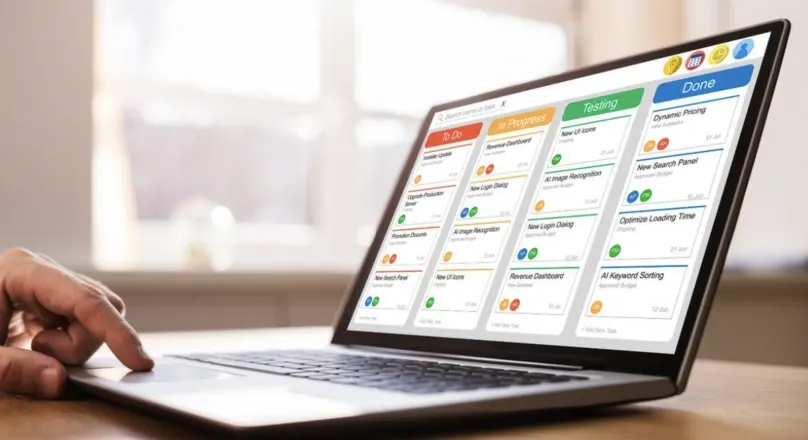
What Is a Web Application? Types, Features & Examples
A web application lets users complete tasks in a browser. Learn what a web application is, its types, features, and how to choose the right one for your business.
Read articleWeb Development
Website vs web application: understand the difference and choose the right solution for your business needs, user goals and future growth.
This article explains the difference between a website and a web application, focusing on user interaction, business needs and technical complexity. You will learn how to assess your requirements and select the most suitable approach for your digital project.
The choice between website vs web application depends on what your users need to do online.
Websites are best for presenting content, news or company information with limited user interaction.
Web applications support user accounts, workflows, data management and integrations for complex business needs.
Web applications require more planning, security and maintenance, which increases costs compared to simple websites.
Choosing between a website vs web application starts with understanding what users need to accomplish. A website primarily presents information, while a web application provides functionality for completing tasks, managing records or interacting with business processes.
The distinction affects development requirements, technical complexity, security and long-term maintenance. For organisations planning a new digital product, understanding these differences helps determine whether a traditional website, existing platform or custom application is the most suitable investment.
The main difference between a website and a web application is how users interact with the product. Traditional websites primarily deliver information, while applications provide tools that allow users to create, modify or manage data through interactive processes.
| Comparison | Website | Web Application |
|---|---|---|
| Primary purpose | Present information and content | Enable users to complete tasks |
| User interactions | Browsing, searching and submitting enquiries | Creating, editing and managing records |
| Typical examples | Company websites, blogs and portfolios | Customer portals, CRM systems and booking platforms |
| Data processing | Often focused on retrieving and displaying information | Frequently involves business rules and data changes |
| User accounts | Optional | Common but not always necessary |
| Backend requirements | May use static files, a CMS or hosted services | Often uses application services and databases |
| Development complexity | Depends on features and content requirements | Depends on workflows, integrations and technical architecture |
| Maintenance | Content, security and functionality updates | Application, data, integration and operational maintenance |
When comparing a web app vs website, focus on the actions users must perform rather than visual appearance. A business presenting services may need a conventional website, while one enabling customers to manage appointments, payments or accounts may require application functionality.
A traditional website mainly delivers information to visitors, even when its content changes dynamically. Websites can include search tools, contact forms and content management features without necessarily requiring a separately developed application.
Common website capabilities include:
A traditional website typically delivers information from a server to a browser, even when the content is generated dynamically. The MDN explanation of client-server communication provides useful background on how browsers request and receive information.
A web application goes beyond presenting content by enabling users to complete more complex actions. These activities may involve creating records, updating information, processing transactions or following workflows governed by business rules.
The main features that distinguish applications include:
The website application difference becomes clearer when comparing actions rather than individual technologies. A customer reading service information is using website functionality, while that customer updating account details or managing an order is using application functionality.
A public website and a private web application can operate as parts of the same digital product. For example, customers may browse service descriptions on a company website before signing in to a portal where they manage appointments, access documents or submit support requests.
These components can share branding and navigation while having different technical responsibilities. The public website focuses on information and discovery, while the application requires appropriate permissions, data processing and operational support.
Tip: When planning a website that includes customer dashboards or interactive features, review the available front-end development technologies before selecting an implementation approach. Consider interface complexity, browser compatibility and how the frontend will communicate with existing systems.
Development cost and ongoing effort depend more on project requirements than whether a product is described as a website or application. Complex workflows, user permissions, integrations and sensitive records can increase implementation and maintenance responsibilities.
| Factor | Website Considerations | Web Application Considerations |
|---|---|---|
| Initial development | Content structure, design, CMS configuration and standard functionality | Interfaces, business rules, databases and integrations |
| Technical architecture | Static hosting, CMS platforms or managed services | Application hosting, APIs and data processing |
| Security | Secure administration, updates and protection of collected information | Authentication, permissions, secure processing and data protection |
| Testing | Content, accessibility, browsers, forms and integrations | Complete workflows, application logic, permissions and data operations |
| Maintenance | Content updates, patches and compatibility checks | Feature improvements, dependency updates and operational monitoring |
| Infrastructure | Hosting and supporting services | Potentially more complex services and databases |
| Future changes | Often focused on presentation and content | May involve workflows, database structures and integrations |
Neither websites nor web applications eliminate security and maintenance responsibilities, as costs depend on data handling, system integrations, existing infrastructure and reusable functionality. Organisations should assess potential technical risks and define their requirements before requesting an estimate, while exploring web development services to understand suitable implementation and long-term maintenance options.
The best solution depends on user needs, existing software capabilities and the level of control required over functionality. Businesses should consider simpler options before committing to custom development, particularly when established products already support their essential workflows.
| Approach | Most Suitable For | Advantages | Limitations |
|---|---|---|---|
| Static website | Informational pages and simple online presence | Straightforward hosting and limited technical complexity | Less suitable for substantial interactive functionality |
| CMS website | Content publishing, marketing and regularly updated pages | Established content tools and reusable features | Custom workflows may require extensions |
| Configurable SaaS platform | Standard business processes and customer management | Existing functionality and vendor-managed services | Customisation and integration restrictions |
| Customer portal platform | Account access, document sharing and self-service | Configurable workflows and permissions | May not support every business-specific requirement |
| Custom web application | Unique processes, specialised integrations and tailored functionality | Greater flexibility over architecture and workflows | More development planning and maintenance responsibility |
A custom application is not automatically the best choice, as existing platforms may meet business requirements with less development effort, while custom solutions are more suitable for unique workflows or integrations. Before deciding, organisations should define essential features, user roles, integration needs and maintenance responsibilities, using this guide on how web development works to understand key implementation decisions and dependencies.
Dev Centre House supports organisations with requirements discovery, technical planning, interface development and application integration. Through its web design services, the team can help plan interfaces that reflect user requirements while assessing the development capabilities needed for the proposed solution.
If you are deciding between a traditional website, configurable platform or custom application, you can book a consultation with Dev Centre House to discuss your business requirements. The conversation can explore user workflows, integration needs, technical feasibility and suitable implementation options before committing to development.
Choosing between a website and a web application depends on the purpose of the product and the activities users need to complete. Informational websites, CMS platforms and custom applications offer different capabilities, development requirements and maintenance responsibilities.
Businesses should prioritise essential functionality, assess existing software options and consider security, integrations and long-term support before making a decision. Explore Dev Centre House's web development services and book a consultation to discuss which approach best supports your project requirements.
Frequently Asked Questions
Short answers on the points readers most often want clarified after this piece.
A website primarily presents information, while a web application enables users to complete tasks and manage information through interactive functionality.
No, contact forms and search tools can be standard website features without requiring a separately developed application.
Yes, a public website can provide information while an integrated customer portal supports account management and other interactive tasks.
Applications can require more development effort when they involve complex workflows, data processing, permissions or integrations.
Custom development is appropriate when essential workflows or integrations cannot be adequately supported by existing websites, SaaS products or configurable platforms.
Keep reading
A web application lets users complete tasks in a browser. Learn what a web application is, its types, features, and how to choose the right one for your business.
Read article
Full stack web development means building both frontend and backend systems so your application works as one. Learn which skills, technologies and roles you need.
Read article
How web development works, step by step, so you can make informed decisions, avoid costly mistakes and guide your website project from planning to launch.
Read articleStart a conversation
Have a new product in mind, an existing system that needs improvement, or a complex business challenge to solve? Tell us what you're looking to achieve, and our team will help you find the right way forward.
We'll understand the problem before recommending a solution.
Get clarity on possible approaches, technologies, and next steps.
Work with experienced professionals across strategy, design, development, and technology.
A straightforward conversation about your project and requirements.
You don't need a complete specification to start a conversation.
Whether you have a detailed project brief or just an early-stage idea, we'll help you understand what's possible and what to do next.
No pressure. No unnecessary jargon. Just a conversation about what you want to build.
Tell us about the work
Your information is kept confidential and will only be used to respond to your enquiry. Privacy Policy
Prefer to Talk First?
That's okay. Start with a conversation.

Suite 5, Plaza 256, Blanchardstown Corporate Park 2, Dublin 15, D15 VE24, Ireland
+353 1 531 4791
Floor 3 East - 3E - 501 5th St - Dubai Int'l Airport, Dubai Airport Free Zone (DAFZA), Dubai, United Arab Emirates
+353 1 531 4791


